NET IPTV offers a 7-day free trial upon first installation. After the trial, a one-time payment of €5.79 is required for permanent activation.
Activation is completed through the developer’s portal — see more.
In this tutorial, we will show you how to install and configure your IPTV subscription on NET IPTV. Simply follow the steps below:
Turn on your Smart TV.
Make sure your TV is connected to the internet so you can download apps.
Find the NET IPTV application:
In the Most Liked category, select the NET IPTV app. Its page will open.
Press Installation.
On the app page, click Download, then Install, and finally Run.
That’s it — the NET IPTV app is now installed on your Samsung TV.
- Please note that the app is paid, but it includes a 7-day trial period.
- The NET IPTV app costs €5.49, payable once on the developer’s website.
- Once the activation is completed, you will be taken directly to the NET IPTV interface and can start using it.
If you want to set up your IPTV subscription yourself, here are the steps:
Go to the NET IPTV website. https://netiptv.eu/upload
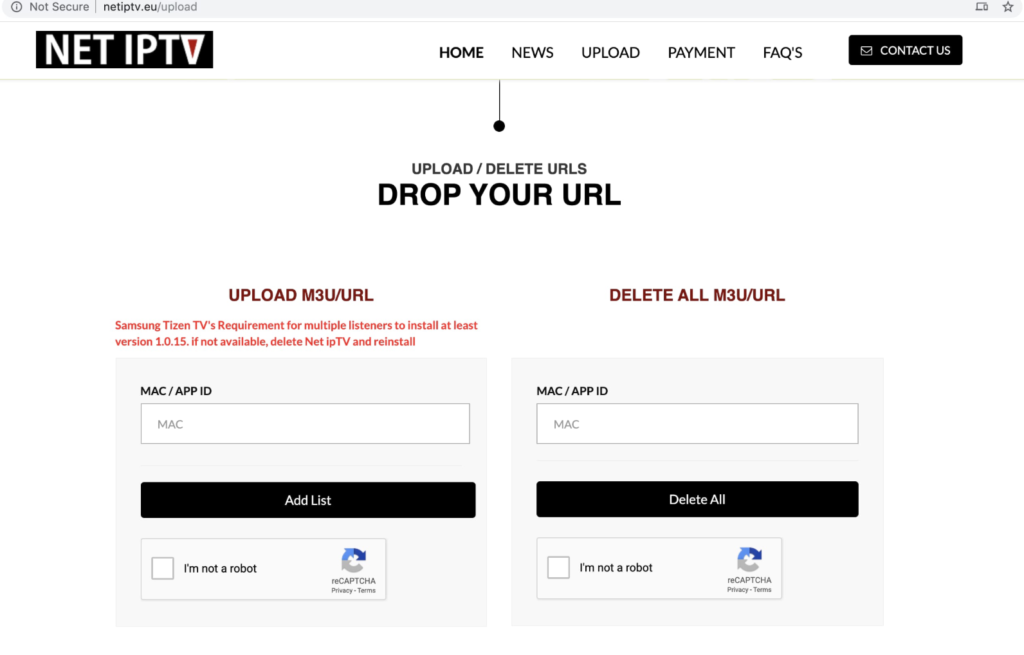
- Add your external playlist links (URLs) — automatic updates included
- Enter your TV’s MAC address
- Enter your M3U playlist
- Complete the Recaptcha verification (I’m not a robot)
- Click Send
- Wait 5 to 10 seconds
- Restart your TV
- Open the NET IPTV application
- Press any key
- Your playlist is now loaded — enjoy watching your live channels! 😊
Now is the perfect time to purchase an IPTV subscription for NET TV — order here: https://iptv.co.id/