Top IPTV Player for Android & Fire TV
TiviMate is a great, free IPTV player where you can watch your IPTV stuff like live TV, movies, and shows in good quality. Lots of folks like it because it looks good and works well.
It works with many gadgets like Android TV Boxes, Amazon Firesticks, Fire TVs, and Android phones and tablets, so it’s great for IPTV fans all over.
This guide will show you how to set up and start using TiviMate on your Firestick, Fire TV, and Android TV Box.
This way, you can quickly binge-watch what you like without any trouble. Why Go With TiviMate IPTV Player?
✔ Simple and easy to use
✔ Works with M3U lists and Xtream Codes API
✔ Changes channels fast and has TV guide support
✔ Works great on Firesticks and Android TV devices If you want a solid IPTV experience, TiviMate is a top pick right now.
TiviMate IPTV Player – Complete Installation & Setup Guide
TiviMate is a popular all-in-one IPTV player that works perfectly with IPTV services providing an M3U playlist URL. It is widely used for its smooth interface, fast navigation, and advanced IPTV features.
How to Install TiviMate on Firestick, Fire TV & Android TV Box
Once you have created and registered your account, you can easily install the TiviMate IPTV Player and configure it with your preferred IPTV service.
Install TiviMate on Amazon Firestick / Fire TV
TiviMate is not available on the Amazon App Store, so it must be installed manually on Firestick or Fire TV devices.
You can install the app on Amazon Fire TV 4K or Firestick using a sideloading method (Downloader app).
Install TiviMate on Android TV Box
If you are using an Android TV Box, TiviMate is usually available directly on the Google Play Store.
Simply search for “TiviMate IPTV Player”, download it, and install it.
⚠️ You may also see TiviMate Companion in the Play Store.
This app is only required to activate TiviMate Premium features and is not used for watching IPTV channels.
How to Set Up IPTV in TiviMate
After installing the application, open TiviMate to start configuring your IPTV service.
TiviMate requires an M3U URL to load IPTV channels. This M3U link is normally provided:
- In the welcome email from your IPTV provider
- Or by contacting your IPTV reseller’s support team
Once the M3U playlist is added, your live TV channels, movies, and series will load instantly.
Why Choose TiviMate IPTV Player?
- ✔ Supports M3U playlists & Xtream Codes API
- ✔ Optimized for Firestick & Android TV
- ✔ Clean interface with EPG support
- ✔ Fast loading & smooth playback
TiviMate is one of the best IPTV players for Firestick, Fire TV, and Android TV devices, making it an excellent choice for IPTV users worldwide.
How to Install IPTV in TiviMate (Step-by-Step Guide)
Once the TiviMate application is successfully installed on your device, you can open the app and start configuring your IPTV service in just a few simple steps.
Important Requirements Before Setup
NOTE:
To use IPTV with TiviMate, you must have a valid M3U playlist URL.
This M3U link is usually provided:
- In your IPTV provider’s welcome email
- Or by contacting the IPTV customer support team
Without an M3U URL, IPTV channels cannot be loaded into TiviMate.
⚠️ Important VPN Notice
IMPORTANT:
We have noticed that IPTV setup in TiviMate may fail if a VPN is enabled during the configuration process.
👉 Make sure to disable your VPN before adding your IPTV playlist to TiviMate.
Once the IPTV service is successfully configured and channels are loaded, you can safely reconnect your VPN to protect your privacy and secure your streaming experience.
Steps to Add IPTV to TiviMate
Follow the instructions below to integrate your IPTV service into TiviMate:
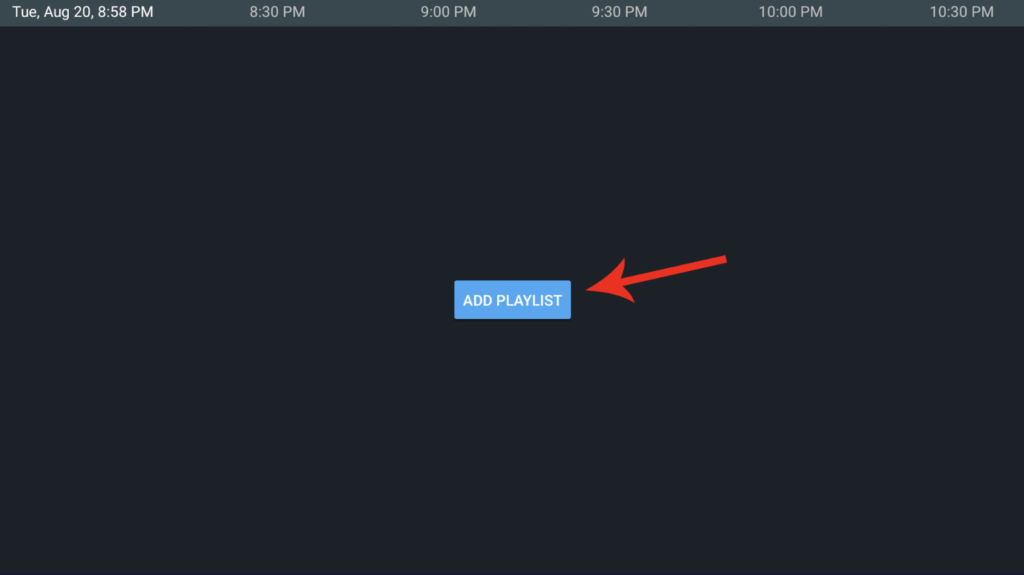
Step 1: Open TiviMate
- Launch the TiviMate IPTV Player on your Firestick, Fire TV, or Android TV device.
- On the main screen, select “Add Playlist”.
From here, you will be able to enter your M3U URL and complete the IPTV setup.
Why Use TiviMate for IPTV?
- ✔ Fast & stable IPTV playback
- ✔ Supports M3U URLs & Xtream Codes
- ✔ Works on Firestick, Fire TV & Android TV
- ✔ Clean interface with EPG support
TiviMate is one of the best IPTV players available, offering reliability, speed, and an excellent user experience.
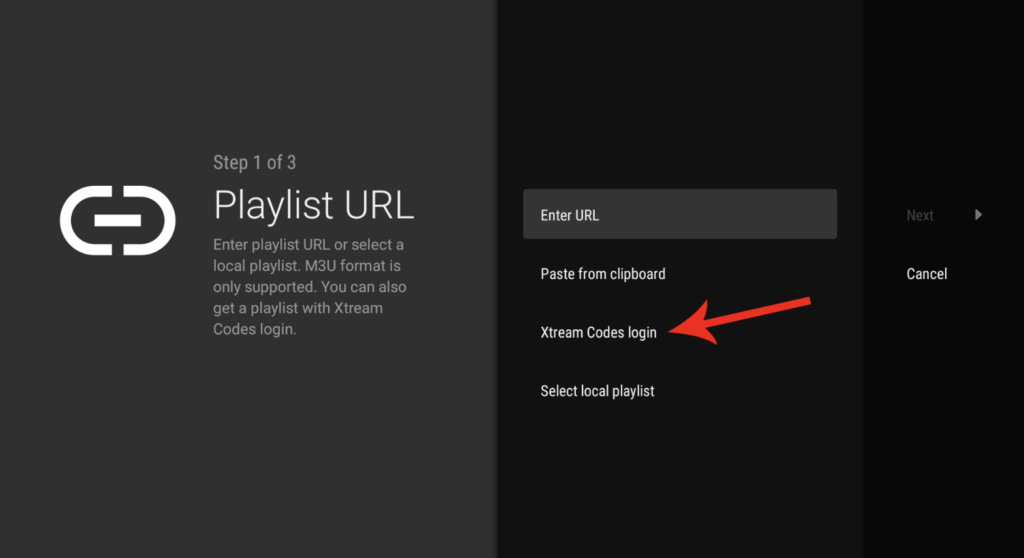
Step 2: Select Xtream Codes Login
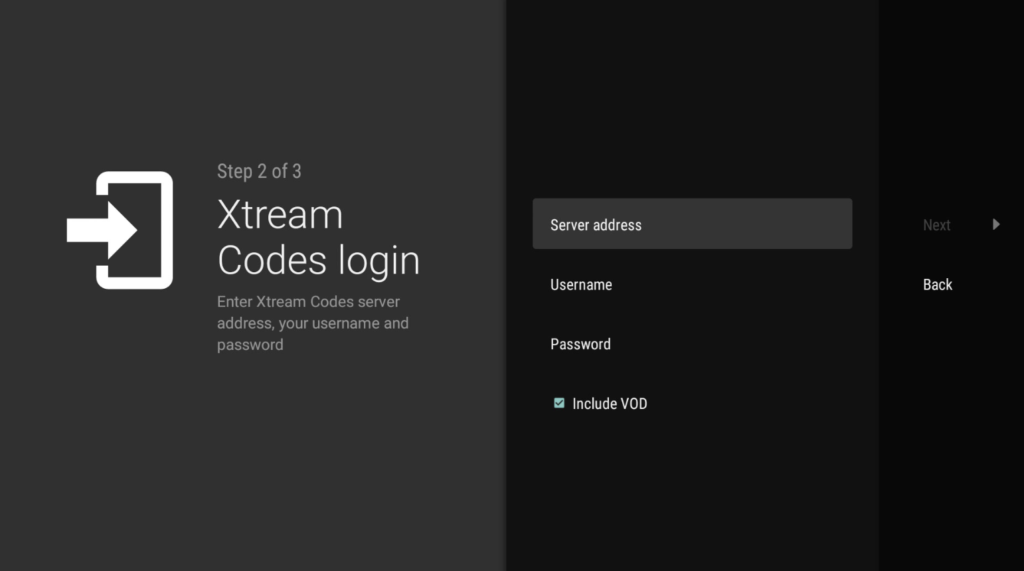
Step 3: Enter Your IPTV Login Details
Enter the information provided to you for your 24-hour free trial or your active IPTV subscription:
- Server URL
- Username
- Password
Make sure all details are entered correctly to ensure a successful connection to the IPTV service.
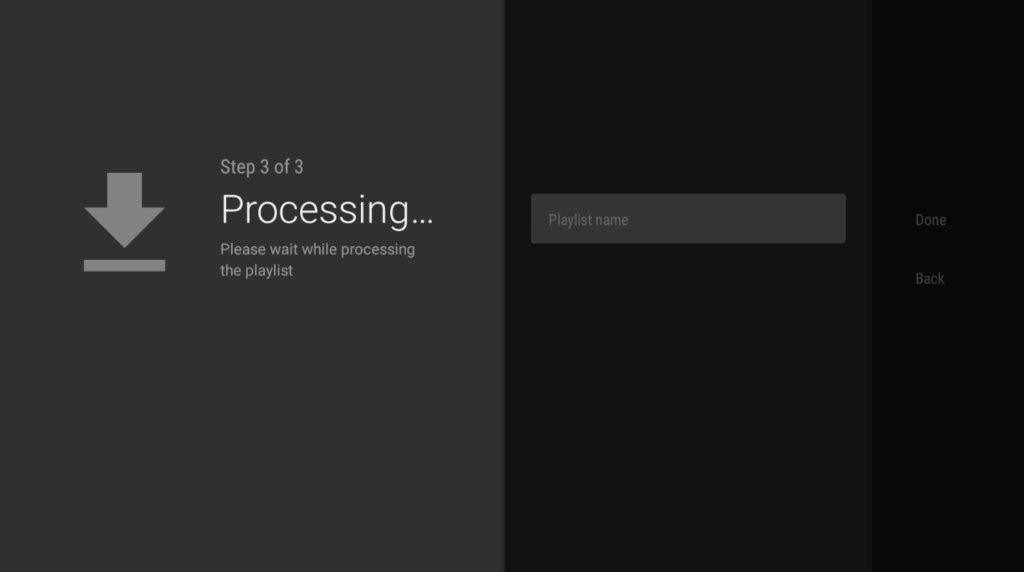
Step 4: Save and Connect Your IPTV Playlist
Save the entered information, choose a name for your playlist, then click Done.
Your IPTV service will now be successfully connected, and you can start watching live channels, movies, and series instantly.
For the best IPTV streaming, a wired Ethernet is the way to go. It keeps things stable and avoids annoying buffering or signal loss. Wi-Fi? Not so much. It can mess with your streaming quality. Thinking about getting an IPTV subscription for TiviMate? Now’s a great time! You can enjoy tons of live TV, movies, and shows in high quality. 👉 Order your IPTV subscription here: https://subscription-iptv.us/