In-Depth Setup Tutorial HOME IPTV is an IPTV gateway that gives you access to TV channels embedded in your IPTV subscription, as well as an array of other content, including movies and TV shows. It’s an excellent application’s choice for Samsung and LG Smart TVs. In this tutorial we will teach you step by step how to install and set up your IPTV subscription on HOME IPTV in the easiest and fastest way possible.
HOME IPTV App
How It Works & How to Find Your MAC Address The HOME IPTV app is an IPTV player that enables users to view their IPTV subscription details and stream live television through their Smart TVs. The app is optimized for the latest generation Samsung and LG Smart TVs for an unrivaled IPTV experience. This guide will walk you through the complete process of downloading, setting up, and using HOME IPTV with an M3U playlist to watch IPTV content on your Smart TV. How to Find Your HOME IPTV MAC Address In order to activate your IPTV subscription, you need to first find the MAC address of your TV.
1. Navigate to the App Store on your Smart TV.
2. Look for HOME IPTV, download and install the app.
3. Launch the app after the HOME IPTV installation process is complete. Your MAC address will now be visible on the screen. You can now use that MAC address to upload your M3U playlist to begin watching IPTV on your Smart TV.
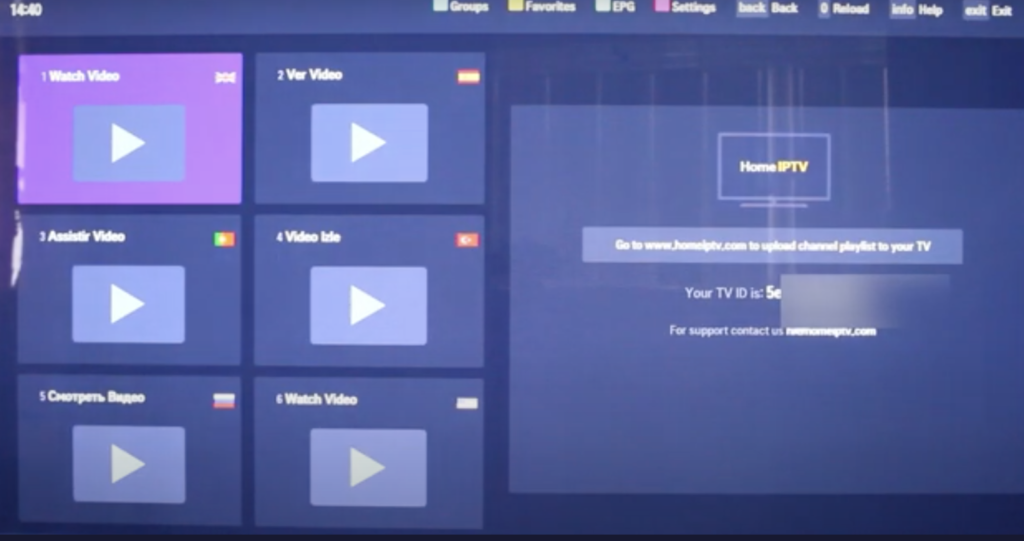
Next, go to the Upload area on the official SITE HOME IPTV activation page.
https://homeiptv.com/activate/
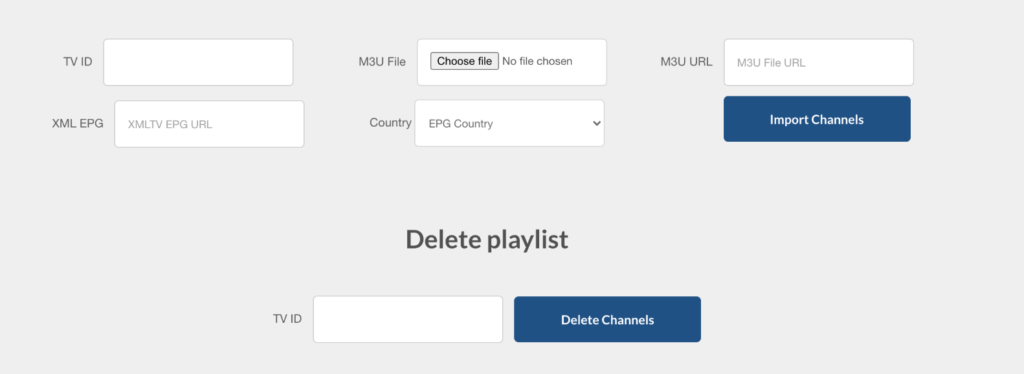
Uploading your Playlist on Home IPTV Go to the activation page and input your TV ID on the first field. After that, either paste your M3U playlist URL or select a playlist file to upload. Click on Import Channels. If you see a success message, go back to the HOME IPTV App on your Smart TV. Press 0 on your remote control to update the app and get the channels. Enjoy your Smart TV and live TV! It’s the perfect time to buy an IPTV HOME IPTV subscription. Order here.
https://subscription-iptv.us/